August 31st - CommonUI Enhanced Input Actions
Something I've always struggled with is handling input cleanly across a complex UI.
It sounds simple at first. The player presses Escape, so you close a menu. But what happens when several different parts of your UI all want to use Escape?
Maybe the Settings menu uses it to close itself. The Level Progress screen does the same. A smaller panel inside the HUD also wants to close with Escape.
If several of those widgets are active at the same time, which one should receive the input?
More importantly, once one of them handles it, how do we prevent every other widget underneath it from responding to the same key press?
This is where CommonUI's Action Domains become extremely useful.

CommonUI already solves a lot of the input problem
I'm using Unreal Engine's CommonUI plugin for the UI in my game.
CommonUI provides several systems for dealing with UI input that either didn't exist, or were considerably less convenient, when I was working in Unreal Engine 4.
One particularly useful system is the combination of CommonBoundActionButton and UCommonBoundActionBar. A UCommonBoundActionBar can automatically display actions that are currently available in the active UI.
For example, if a menu exposes a Back action bound to Escape or the gamepad's B/Circle button, the appropriate button hint can automatically appear in the action bar.
That is incredibly convenient because the UI doesn't have to manually keep those button hints synchronized with whatever screen is currently active.

But displaying the available actions is only part of the problem.
We still need to decide who gets to handle those actions.
The problem: everybody wants Escape
Escape is probably the easiest example.
Imagine that the player currently has several UI windows open. The Settings menu wants Escape to close Settings. The Level Progress menu wants Escape to close Level Progress. The HUD may also contain a smaller panel that wants Escape to close itself.
If all three are active, pressing Escape should normally close one thing, not all three.
What I want is essentially this:
Give the highest-priority UI the first chance to handle the input. If it handles it, stop. If it doesn't, continue down to the next appropriate UI.
CommonUI has a system specifically designed for this.
UCommonActivatableWidget and Action Domains
The first important part of the solution is UCommonActivatableWidget.
CommonUI builds an input-routing tree from active Activatable Widgets. Rather than treating every widget on screen as an unrelated object listening for input, CommonUI can reason about which active UI should receive an action first.
For larger UI systems, Activatable Widgets are commonly placed inside containers such as UCommonActivatableWidgetStack.
The Activatable Widget is the screen, menu, panel, or other piece of UI that participates in CommonUI's activation and input system.
The Activatable Widget Stack is one of the containers that you can push those widgets into.
In my game, my root HUD contains several of these UI layers.

Whenever I need to open something, I asynchronously push the corresponding Activatable Widget onto its appropriate layer.
I deliberately have multiple layers because I want several independent pieces of UI to be able to exist on screen at the same time.
That creates the next problem.
Which layer gets the input first?
This is where UCommonInputActionDomain comes in.
What is an Action Domain?

An Action Domain describes how input events are allowed to flow through a section of your UI.
You can assign an Action Domain to an Activatable Widget, allowing CommonUI's Action Router to consider that domain when deciding where an input event should travel.


The two settings that matter most for this are:
Behavior controls whether an input event is allowed to continue from one Action Domain into the next Action Domain.
Inner Behavior controls whether the event is allowed to continue to another active widget with a lower Z-order inside the same Action Domain.
This distinction is the key to understanding the entire system.
Think of it like this:
Behavior
    Domain -> Domain -> Domain

Inner Behavior
    Widget -> Widget -> Widget
    inside the same Domain
Once I understood that, Action Domains became much easier to reason about.
The three flow behaviors
Both Behavior and Inner Behavior use ECommonInputEventFlowBehavior.
There are three possibilities.
BlockIfActive
means that the event flow stops because something in this domain is active. It doesn't matter whether the input was actually handled.
BlockIfHandled
means that the event flow only stops if the input was handled. If nobody handled it, CommonUI can continue searching farther down the routing hierarchy.
NeverBlock
means that this domain does not stop the event from continuing to another domain.
That gives us enough control to create some very useful UI layers.
My Action Domain setup
For my game, I've currently divided the UI into three conceptual domains.
DA_InputDomain_Blocking

Behavior:
    BlockIfActive

Inner Behavior:
    BlockIfActive
This is for UI that should take complete ownership of input. If something in this domain is active, nothing underneath it should be allowed to respond.
Then I have my normal menu domain:
DA_InputDomain_Menu

Behavior:
    BlockIfHandled

Inner Behavior:
    BlockIfHandled
If the highest-priority menu handles Escape, input stops there.
If it doesn't handle Escape, the event is allowed to continue.
The same principle applies between widgets inside the domain because Inner Behavior is also BlockIfHandled.
Finally, I have my HUD domain:
DA_InputDomain_HUD

Behavior:
    NeverBlock

Inner Behavior:
    BlockIfHandled
The HUD generally sits at the bottom of my UI hierarchy, so I don't want it acting like a modal layer and preventing higher-level systems from participating in input routing.
Inside the HUD domain itself, however, I still want a widget that handles an action to prevent another lower-priority HUD widget from responding to that same action.
The Action Domain Table
Creating the Action Domains themselves is not enough. CommonUI also needs to know the order in which those domains should be evaluated.
For that, CommonUI uses UCommonInputActionDomainTable.
The table contains an ordered array of Action Domains, and CommonUI evaluates them in ascending index order.
For my setup, the conceptual priority looks like this:
Highest priority

DA_InputDomain_Blocking
DA_InputDomain_Menu
DA_InputDomain_HUD

Lowest priority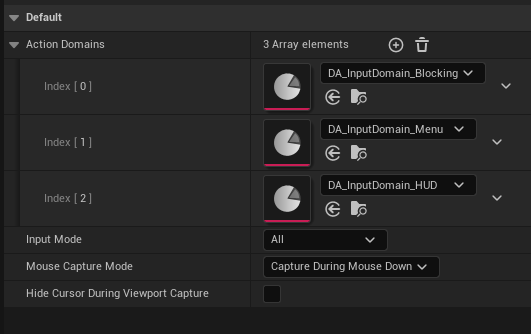
This table is what gives the domains their relationship to each other.
Without it, saying that something belongs to the "Menu" domain doesn't tell CommonUI where that domain belongs compared with "HUD" or "Blocking".
A practical example
Now let's look at the problem I originally wanted to solve.
Suppose the player has opened several windows.
My UI might conceptually look something like this:
SettingsMenu
    Activatable Widget
    Domain: Menu

LevelProgressMenu
    Activatable Widget
    Domain: Menu

MainGameHUD
    Activatable Widget
    Domain: HUD

    LevelPickerMenu
        Activatable Widget
        Domain: HUD

    RightSideOptionsMenu
        CommonUserWidget
Now imagine that Settings and Level Progress are both active.
The player presses Escape.
Because both belong to DA_InputDomain_Menu, CommonUI first routes the event according to the active widget hierarchy and Z-order inside that domain.
Settings is currently the higher-priority active widget, so it gets the first opportunity to respond.
Settings handles the Back action and closes itself.
Because the Menu domain uses:
Inner Behavior = BlockIfHandledthe event stops.
Level Progress never sees that particular Escape press.
The player presses Escape again.
Settings is gone, so Level Progress is now the highest-priority menu capable of handling the action. It receives the input, handles it, and closes.
What about two windows inside the same UI layer?
This was another problem I ran into.
Imagine that two visible windows ultimately participate in the same Activatable Widget input tree.
If both independently register the same Back action without giving CommonUI enough structure to distinguish their priority, it becomes much harder to guarantee that only the correct window responds.
The clean solution is not to manually start adding checks such as:
if Settings is open...
if LevelPicker is open...
if SomethingElse is open...
If a window is important enough to independently participate in input routing, I make
it an Activatable Widget and place it correctly in the activation tree.
For example:
MainGameHUD
    Domain: HUD

    LevelPickerMenu
        Activatable Widget
        Domain: HUD

    RightSideOptionsMenu
        CommonUserWidget
Now LevelPickerMenu participates directly in CommonUI's Activatable Widget hierarchy.
Because the HUD domain uses:
Inner Behavior = BlockIfHandledthe Level Picker can handle the Back action and prevent lower-priority widgets inside the same domain from also reacting to it.
This is much cleaner than having every widget manually know which other menus happen to be open.

Comments